article
3 Effective Type Narrowing Techniques in TypeScript
There are three ways to accomplish type narrowing: using conditional blocks, type predicate functions, and discriminated unions.
What do you do when you need to check the type of a certain variable or value? The process of knowing the type of a variable is known as type narrowing, which is a way to assert the type to act based on the result.
By doing this process, you can get a more specific type, allowing you to perform the correct action, and make your code more expressive and less error prone.
The type narrowing process can be achieved in three different ways:
- Conditional blocks
- Type predicate functions
- Discriminated unions
In this article, we will review how to use each of them and the pros and cons of each approach.
Knowing how to narrow your types is an important skill for any TypeScript developer, and you are probably already doing it! Let's dive in and review how to do type narrowing.
<Callout>If you'd like to learn more about type narrowing along with many other more advanced TypeScript courses, check out the course Advanced TypeScript Fundamentals
</Callout>Using Conditional Blocks
The first approach is to use simple conditional blocks.
We’ll use the good ‘ol if block.
The idea is to review if the variable has a particular property that informs you that the variable belongs to a certain type. By checking the type, you will inform the Typescript type checker to "move" the type from a broader or larger category to a smaller/specific type.
This can be achieved in several ways, one of which involves utilizing the in operator to check whether a specific property exists within an object:
type Square = {
  size: number;
}

type Circle = {
  radius: number;
}

type Shape = Square | Circle;

function area(shape: Shape) {
  if ("size" in shape) {
    // shape is a Square
    return shape.size * shape.size;
  }
  // shape is a Circle
  return Math.PI * shape.radius * shape.radius;
}
The example creates two types, Square and Circle, and a union type, Shape. Then there is a function, area, that takes a Shape and returns the area of the shape.
The shape argument is annotated as Shape, meaning that can be any of the two types in the union.
To be able to correctly perform the calculation you need to check what type of shape are you using. The first step is then to check the properties of the shape to assert if is a Circle or Square.
The function use the in operator to check if the size property exists on the shape object. If it does, you know that shape is a Square. If it doesn't, the you know hat shape is a Circle and the calculation can be done using the other property.
Another way to accomplish this is to use the
hasOwnPropertymethod on the object variable. For simple objects theinoperator and thehasOwnPropertymethods are equivalent. The difference lays on that theinoperator will returntruefor inherited properties, whereashasOwnPropertyfunction will returnfalse.
But as everything in life, there are tradeoffs that you need to know.
Pros:
- Are easy to use and don't require any additional setup. This makes them a good option for simple type narrowing scenarios where you only need to check a variable against a few possible types.
- Can be used in a wide range of scenarios, from simple type narrowing to more complex type checking scenarios.
Cons:
- Can be verbose, especially when dealing with large or complex data structures.
- May not work in all scenarios. For example, if you needs to make a type assertion based on a property that is not present in all the types being checked, conditional blocks may not be the best tool for the job.
Another potential downside of using conditional blocks is that they can introduce additional branching in the code, which can increase the complexity of the codebase.
Using Type Predicate Functions
First, what are type predicate functions?
A type predicate function is a function that returns a boolean value, but it has a special type signature. For example:
function isSquare(shape: Shape): shape is Square{
  return "size" in shape
}
The isSquare function is a simple function that follows the previous example of using a conditional block with the in operator, it takes a variable shape and returns a boolean indicating if the shape variable is or not a Square.
The part that differentiate this function from others is the special type signature that includes the shape is Square syntax. This tells Typescript that the function is a type predicate that narrows down the type of the shape argument to Square.
Or in other words, you're telling TypeScript that any variable that passes through this function and returns true can be safely considered a Square
Here it is in action:
type Square = {
  size: number;
}

type Circle = {
  radius: number;
}

type Shape = Square | Circle;

function isSquare(shape: Shape): shape is Square{
  return "size" in shape
}

function area(shape: Shape) {
  if (isSquare(shape)) {
		// shape is a Square
    return shape.size * shape.size;
  }
  // shape is a Circle
  return Math.PI * shape.radius * shape.radius;
}
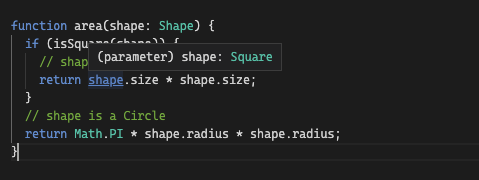
Same as the previous example, you have two types: Square and Circle but this time you’ll use the type predicate function isSquare.
The important bit about type narrowing (with any method) is that after the assertion typescript will show you the narrowed type of the variable, if you hover over shape after the use of the type predicate function you can see that is annotated as Square and not as Shape
Pros:
- Are flexible and can be used in a wide range of scenarios.
- Can be reusable, making them more efficient and easier to maintain.
- Can improve code readability by providing descriptive names for type checks.
But maybe more important than the good parts, are the bad parts.
Cons:
- Can introduce additional complexity and potential errors if not used carefully. If the type predicate function is not properly defined or applied, it may lead to type assertions that are incorrect or incomplete.
- Can add overhead to the code, especially if they are applied to a large number of variables.
- Can be vulnerable to code changes.
What do I mean by “vulnerable to code changes” or “errors if not used carefully”?
Type predicates are similar to type assertions. They are a way to tell Typescript that you know more about the code and types than the analyzer, and this can be true in several scenarios but you need to be careful with this.
Here is an example where you, as a developer, can lie to Typescript and everything will “be good”.
type Square = {
  size: number;
}

type Circle = {
  radius: number;
}

type Shape = Square | Circle;

function isSquare(shape: Shape): shape is Square{
  return "radius" in shape  // Here is the change
}

function area(shape: Shape) {
  if (isSquare(shape)) {
    // shape is a Square
    return shape.size * shape.size;
  }
  // shape is a Circle
  return Math.PI * shape.radius * shape.radius;
}
A subtle change to the previous example.
I just changed the condition inside the isSquare function, now the type predicate function says that if the shape argument has the radius property it should be considered a Square.
But, squares don’t have a radius right?
That subtle change can break the application functionality in runtime since it will be not noticed by the type-checker:

You can see that Typescript still thinks that the shape object is an Square after the condition. And, there is no error accessing the size property because TypeScript understands that if the variable is considered as Square it should be ok to access size.
In summary, type predicates are a nice way to describe what you want, and are both expressive and simple. However, they can be a double-edged sword. If you are going to use them, be sure to have a good test suite around to avoid these issues.
Using Discriminated Unions
Discriminated unions are a way to define a set of related types, each with a unique discriminator property.
These types can be combined into a union type that can be used to represent a range of possible values. By using this “discriminator property” you can do secure assumptions about a type.
A discriminator property is a common property, present in all the types that are part of the union. You then can use that property to “securely” identify the specific type of an object in the union.
The core idea here is that each type that will be part of the union should have a property, with the same name, but different values.
It can be any property that is common to all the types in the union, but it is usually a string or number:
type Square {
  kind: "square";
  size: number;
}

type Circle {
  kind: "circle";
  radius: number;
}
type Triangle {
  kind: "triangle";
  b: number;
  h: number;
}

type SomethingElse {
  kind: "unknown";
  size: number;
}

type Shape = Square | Circle | Triangle | SomethingElse;
Similar to the examples of previous section, let’s use the Square and Circle shapes but add two more types: Triangle and SomethingElse.
Each of the types have a unique property: kind with a unique value for each one.
Then, same as before, they are combined into a union named Shape
Now, let’s refactor the area function to use the discriminator to perform its tasks:
function area(shape: Shape) {
  switch (shape.kind) {
    case "square":
      // shape is a Square
      return shape.size * shape.size;
    case "circle":
      // shape is a Circle
      return Math.PI * shape.radius * shape.radius;
     case "triangle":
	// shape is a triangle
	return (shape.b * shape.h) / 2
      default:
	 // shape is unknown or SomethingElse
	 return shape.size
  }
}
The area function now use a switch statement to revise the kind property that is present in all the Shape constituent (you can also keep using a series of if blocks if you want).
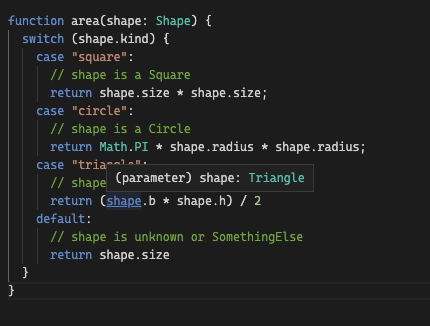
Depending on the value of the kind property, you’ll now what type, Square, Circle, Triangle or SomethingElse you have and then calculate the area accordingly.
Same as before, you can see the TypeScript will correctly annotate the type of shape after the type narrowing check:
Check the code in the typescript playground
Let’s check the good and bad parts of using discriminated unions.
Pros:
- They allow you to make precise assertions based on its discriminator property.
- By using a discriminator property is easy to see which type each variable belongs to.
- Can be used from simple to complex modeling use cases.
Cons:
- Can introduce additional complexity to the code, especially when dealing with large or complex data structures.
- Can be vulnerable to changes in the code, especially if the discriminator property is changed or removed.
- You need to refactor your code/types to introduce them
Conclusion
Type narrowing is an essential process when writing Typescript code. It is a way to be sure that the value you’re using is of the correct type, and by doing so you can still use the tools offered by your editor as a good auto-completion since Typescript will know exactly what type the variable/value is.
In this article, we explored three ways to perform type narrowing: conditional blocks, type predicate functions, and discriminated unions. And for each case we reviewed the pros and cons.
The key take away I want you to grab is that none of these approaches are perfect and that it depends on your specific needs.
- Conditional blocks are a great option for simple scenarios,
- Type predicate functions are a good ergonomic and DRY but have a risk of lying to typescript.
- Discriminated unions can be useful for scenarios where you need to work with related types that have a common discriminator property.
Regardless of which approach you choose, you need to be mindful of why and how to use them to keep improving the type safety of your codebase.
Be sure to check the other articles on the Typescript series: